
Nacsport vs Hudl Sportscode: Comparison and Best Alternative in 2026

If you are reading this, you are probably at that crossroads that every analyst has faced. Your club has asked you to professionalize the analysis department, or you want to take the leap from using a generic video editor like Adobe Premiere Pro, Final Cut, or iMovie to specific software for match analysis.
You look at the market and see two undeniable giants: Hudl Sportscode and Nacsport.
You read the Nacsport blog, and they tell you they are the best alternative due to their robustness on Windows. You go to the Hudl website, and they sell you the "Premier League standard" and the NBA standard. You visit generic comparison sites like Capterra or G2 and see lists without any real sports context.
But no one tells you the fine print:
- What happens if I buy a Mac and my club uses Nacsport?
- What happens if my budget is €200 and not the €3,000 that Elite licenses cost?
- Do I really need to learn complex "scripting" to analyze the build-up play of my U-16 team?
Many questions and many doubts. It is normal because you investigate a little further and find other alternatives that might fit: Longomatch, Once Sports, Eric Sports, Dartfish, or LiveTag Pro. Mind you, these are very good options, each with its niche, but they often present limitations in terms of operating system, usability, or pricing.
In this article, we are not going to sell you smoke. We are going to open the hood of the three main options in 2026 so you can decide with data: Sportscode, Nacsport, and the new hybrid path proposed by TactiCode.
Executive Summary: Who is Who?
Before getting into the mud, let's place everyone on the current tactical analysis map.
1. Hudl Sportscode: The Formula 1 Ferrari
It is the undisputed standard in the absolute elite (NBA in basketball, Champions League in football).
- Philosophy: Raw power, integration with tracking data (Second Spectrum, ChyronHego), and total customization through code scripting.
- The Wall: It is macOS exclusive and has a very high price tag. Hudl usually negotiates corporate packages with clubs ("Elite Service"), making prices opaque for the individual user.
- Verdict: If you have unlimited budget, an IT department, and use Mac, it is a beast.
2. Nacsport: The All-Terrain Tank
The preferred option in the Hispanic market and traditionally in Windows environments, although they have made efforts to reach Mac.
- Philosophy: A robust, modular software with many scalable versions (Basic, Basic+, Scout, Pro, Elite).
- The Wall: Its artificial limitations in lower versions. Its entry-level versions ("Basic") have button limits (max 25) and capped features that force you to climb the ladder (and price) quickly.
- Verdict: The logical option if you already have a Nacsport ecosystem in your club and a powerful PC.
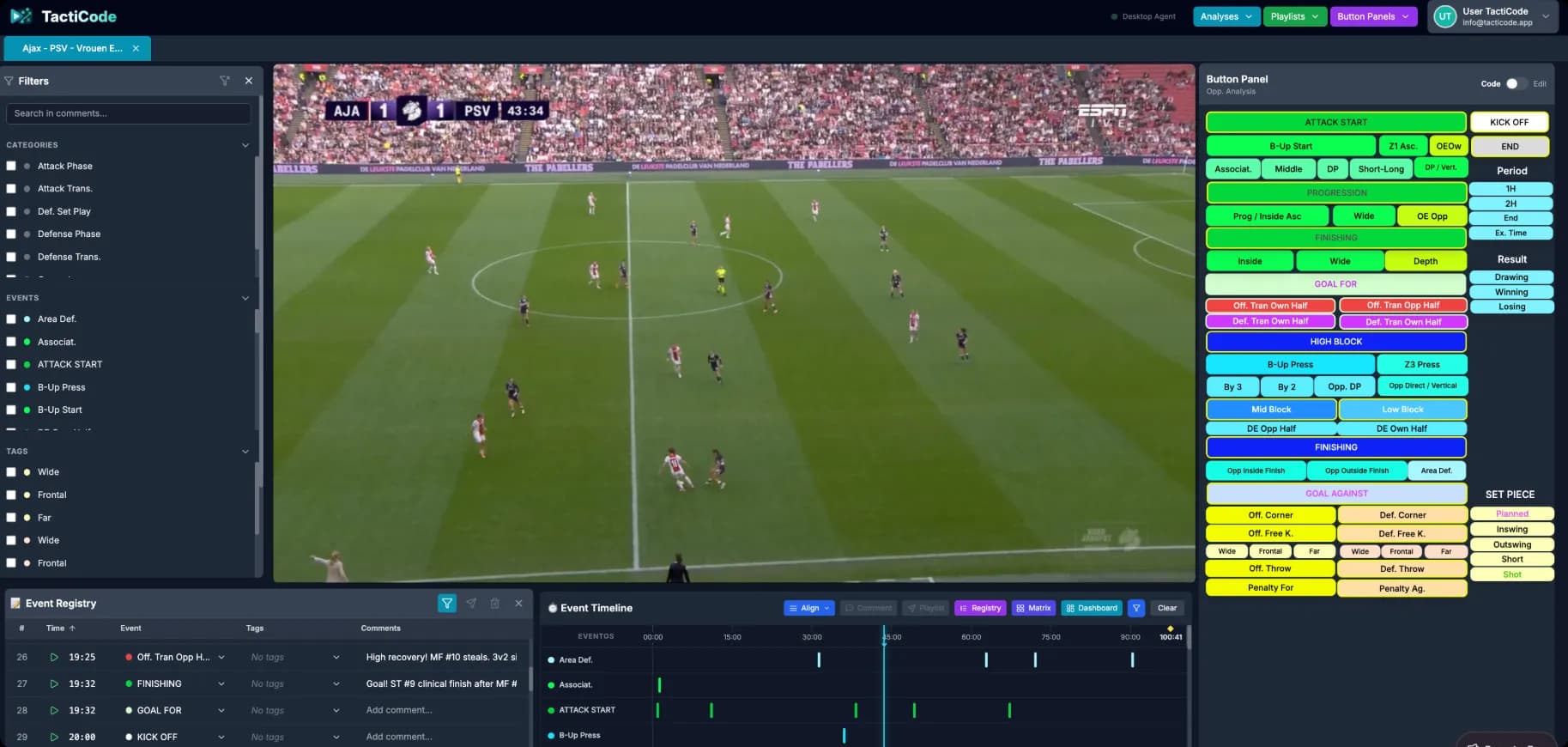
3. TactiCode: The Hybrid Revolution
A novel alternative that seeks flexibility, an affordable price, and adapts to all profiles, from freelancers to professional coaching staffs.
- Philosophy: Democratize analysis. No artificial button limits, no operating system lock-in, and a modern interface that doesn't look like it's from Windows 98.
- The Key: Uses a hybrid architecture. Modern web interface (fluid, beautiful, like Notion/Spotify) + Local Desktop Agent (raw video processing power).
- Verdict: The best value for money if you are looking for Pro functions (Data Matrix, XML, Drawing) without mortgaging yourself.
| Característica | Sportscode | Nacsport | TactiCode |
|---|---|---|---|
| Sistema Operativo | Mac Only | Windows (Mac con Parallels/Nativo LTD) | Windows & Mac (Nativo) |
| Precio Anual (Aprox) | > 3.000€ | 300€ - 2.000€ | Beta Gratis (<200€ futuro) |
| Límite Botones (Basic) | N/A | 25 Botones | Ilimitado |
| Telestration (Dibujo) | Pago Extra | Pago Extra (KlipDraw) | Incluido |
| Exportación XML | Versiones Pro | Versiones Pro | Incluido |
| Matriz de Datos | Versiones Pro | Versiones Pro | Incluido |
| Interfaz | Compleja (Scripting) | Clásica (Ventanas) | Moderna (Web/App) |
Round 1: Operating System and Compatibility
Here is where the real headaches begin for many coaches and analysts working in mixed environments.
Hudl Sportscode
It is Mac Only. Period. There is no Windows version.
- Pros: It is extremely optimized for Apple hardware. It flies on new M3 chips.
- Cons: If your club gives you a Windows laptop, you can't use it. If you have a gaming PC at home and a Mac at work, you can't take work home.
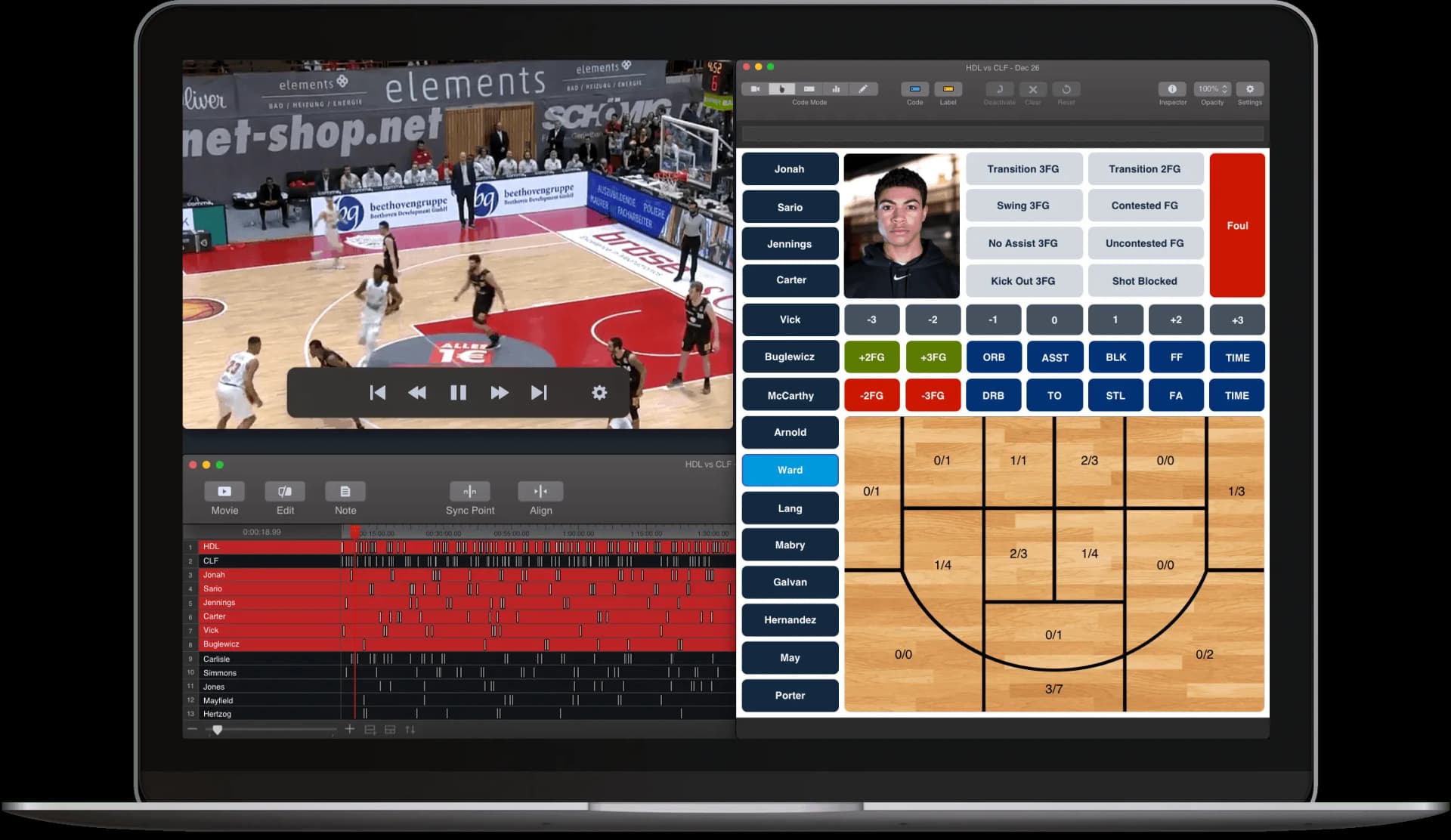
Nacsport
It is Windows Native. The king on PC. Since 2023, they offer options to run it on Mac.
- The Reality: For years, Mac users had to use "Parallels" or "BootCamp" (Windows emulators) to run Nacsport, which consumed a lot of resources and battery. Now they have a native version for macOS, which is a great advance, but it still has the Windows DNA in its interface and workflow.
TactiCode
It is Hybrid Web-Based. By running on the Chromium engine with a local agent developed in Rust/Go:
- It runs native on Windows (leveraging your NVIDIA/AMD graphics card for rendering).
- It runs native on macOS (optimized for Apple Silicon M1/M2/M3 chips by default).
Moreover, it is optimized to run on modest hardware. The Local Agent works in the background managing heavy video, while the interface flies lightly in the browser.
The Real Collaboration Advantage
Real Scenario: The head coach has a personal MacBook Air. The analyst uses a powerful PC at the office.
With TactiCode, you share the analysis file (.ttAn or XML) and both open it natively. No conversions, no virtual machines, no friction.
Round 2: Artificial Limits (The Great Secret)
When you compare prices, sometimes you see: "Nacsport Basic costs ~€150-200". And you think: "Great, it's cheap, it works for me". But what do you really get for that price? This is where reading the technical specifications becomes important.
The limits of competitors' "Entry-Level" versions
Basic versions are often a "hook" to get you into their ecosystem, but soon you hit glass ceilings:
- Button Limit: In Nacsport Basic, you are limited to 25 buttons. In Basic Plus, to 50. If you want to analyze a match in depth (Attacking phases, defense, transitions, set pieces, and 15-20 individual players), 25 buttons fall short in the second week.
- Dashboard Limit: Often you cannot create complex interactive data dashboards in cheap versions.
- Data Matrix: This is the jewel in the crown of analysis. It allows you to cross Who (Player) did What (Action) and Where (Zone). Problem? In the budget versions of Nacsport and Sportscode, this matrix is usually blocked or very limited. Only accessible by paying for Scout or Pro licenses (>€600-1000).
TactiCode's Proposal: "Analyze Without Shackles"
At TactiCode, we have opted for a different philosophy: giving the amateur analyst the tools of the professional. We want to flee from artificial limits.
- Unlimited Button Panels: Create 100 buttons if you want from day 1. Use Categories (Events) and Descriptors (Labels) systems without restrictions.
- Unlimited Analyses: You don't have to delete old matches to "make room". Your limit is your computer's hard drive.
- Unlimited Playlists: Create as many playlists presentations as you need. Mix video clips with text slides, tactical images, and drawings.
- Data Matrix (Included): Yes, even in the Beta version. You can filter data crossovers (e.g., "Missed Passes" + "Busquets" + "Build-up Zone") and export that matrix to Excel/CSV.
- XML Export (Universal): TactiCode speaks the universal language of video analysis. You can export your events to XML so a colleague with Hudl or Nacsport can import them. Interoperability is key in 2026.
- Low-Cost Philosophy Pay for storage, not functionality.
- Pro Philosophy If the tool can do it, you can use it. No paid unlockables.
Round 3: Workflow and Learning Curve
Time is a coach's scarcest resource. You can't afford to spend 3 months learning to use software before analyzing your first match.
Sportscode: Power with a Steep Learning Curve
Sportscode is incredibly powerful thanks to its Scripting system. You can program buttons to calculate statistics in real-time.
- The Reality: It requires almost a basic programming course to get real value out of it. If you don't know how to code for the buttons, you are driving a Ferrari in first gear.
Nacsport: Classic Desktop Functionality
It has a classic Windows floating window interface. It is functional and does the job perfectly.
- The Reality: It can feel overwhelming at first with so many menus, submenus, and windows opening separately (Player, Timeline, Template, Dashboard...). It requires a dual-monitor setup to work comfortably.
TactiCode: Modern UX/UI (SaaS)
We have designed the interface following 2026 design standards. If you know how to use Spotify, Notion, or Linear, you know how to use TactiCode.
- All in one window: Magnetic timeline, 4K player, and integrated tagging panel.
- Drag and Drop: To create playlists or move clips.
- Dark Mode: Native and restful for the eyes (we know you analyze at night).
"Cloud vs Local"
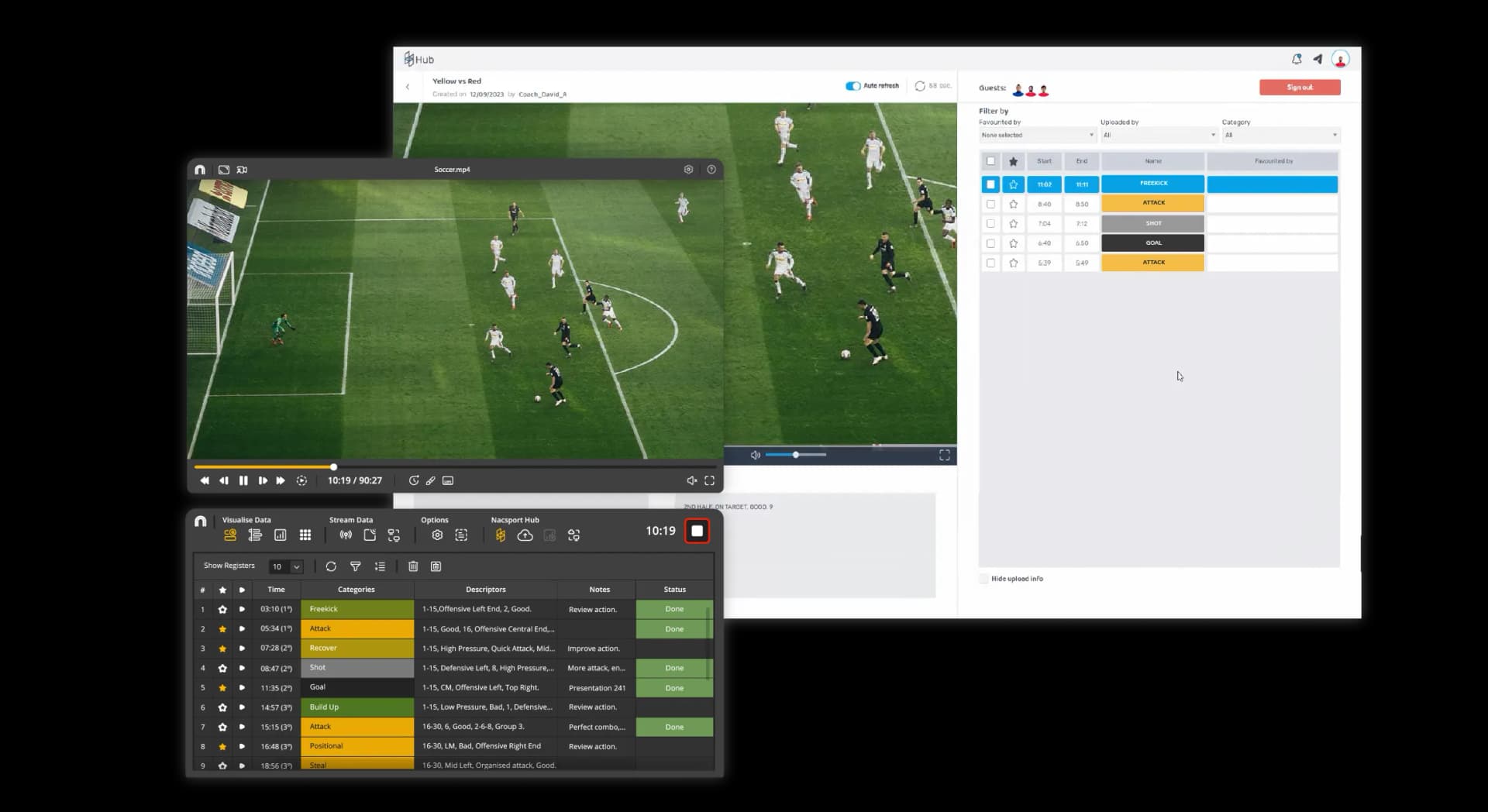
Competitors' "Elite" versions have integrated cloud platforms to upload videos for players to watch on mobile. It's great, but very expensive. TactiCode dispenses with hosting your videos (which weigh gigabytes and are expensive to maintain) and focuses on hosting your data.
- Privacy: The video never leaves your PC.
- Security: Data (clips, labels, drawings) syncs to the cloud. If your computer breaks, you install TactiCode on another one, log in, put the video in, and voilà, your analysis magically reappears.
Round 4: Collaboration, Drawing, and Final Price
Here is where the scale definitively tips for most non-professional or semi-professional clubs.
The Cost of "Telestration" (Drawing on Video)
In modern analysis, showing the clip is not enough; you have to highlight the space, draw the defensive line, or mark the free player.
- Competition: You often need to pay for an extra module (like KlipDraw in Nacsport) or buy a higher license (Studio in Sportscode) to have advanced drawing tools.
- TactiCode: Telestration comes standard. Arrows, circles, zones, text, and soon, automatic tracking. We believe communicating should not be an "extra".
Final Verdict: Which Software to Buy in 2026?
Let's be honest and transparent. There is no "best software in the world", there is the best software for your current context.
-
Choose Hudl Sportscode if:
- You work in a First Division / Champions League club.
- The budget is paid by the club (thousands of euros/year).
- You need to integrate positional tracking data in real-time.
- Your entire staff uses Mac.
-
Choose Nacsport if:
- You are an intensive Windows user.
- You like classic and robust desktop software.
- You need very specific features of Live Tagging with multiple synchronized cameras locally.
- You don't mind paying annual support updates.
-
Choose TactiCode if:
- You are looking for the best value for money on the market.
- You need Pro functionalities (Matrix, XML, Unlimited, Drawing) but your budget is limited (
<€200/yearor Free in Beta). - You use Windows and Mac interchangeably or collaborate with people who use other systems.
- You want to start TODAY, without complex learning curves.
- You value a modern, clean, and fast interface.
Luckily for everyone, tactical analysis is changing. You no longer need a huge PC tower or a €3,000 license to win the weekend match. Technology has advanced, and tools like TactiCode are here to prove it.
Want to check it out for yourself? Join the TactiCode Public Beta. Download the agent, import your first match, and discover the freedom of analyzing without limits.
Join the New Generation of Tactical Analysis
Sign up for the TactiCode beta and start analyzing for free now.
Acceder a la Beta